





Highrise のデータをDevExpress Data Grid にデータバインドする。

Highrise 用の CData ADO.NET プロバイダーはサードパーティーコントロールで使うことのできる通常のADO.NET データベースアクセスコンポーネントを実装しています。データバインドするための通常のADO.NET プロセスに従うことで、UI コントロールから実データへの双方向アクセスを可能にします。 この記事では、CData を使ってDevExpress Windows Forms とウェブコントロールにデータバインドする方法を説明します。ここでは、最新のデータを表示するチャートにデータバインドします。
Highrise はOAuth 認証標準を利用しています。Highrise に認証するには、Highrise にアプリケーションを登録し、OAuthClientId、OAuthClientSecret、およびCallbackURL を取得する必要があります。データへの接続には、AccountId の設定も必要です。
OAuth の使用については、ヘルプドキュメントの「はじめに」を参照してください。
Windows Forms コントロール
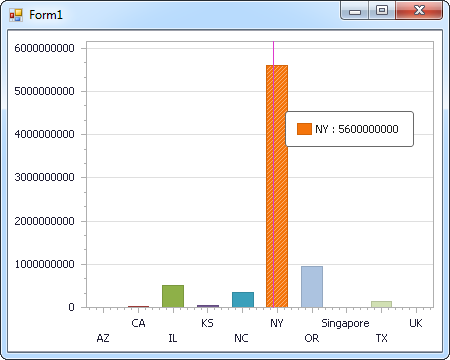
下のコードでは、Highrise でDevExpress のチャートに追加する方法を説明します。HighriseDataAdapter はチャートコントロールのSeries プロパティにバインドします。コントロールのDiagram プロパティはx 軸とy 軸をカラム名として定義します。
using (HighriseConnection connection = new HighriseConnection(
"OAuthClientId=MyOAuthClientId;OAuthClientSecret=MyOAuthClientSecret;CallbackURL=http://localhost;AccountId=MyAccountId;")) {
  HighriseDataAdapter dataAdapter = new HighriseDataAdapter(
  "SELECT Name, Price FROM Deals", connection);

  DataTable table = new DataTable();
  dataAdapter.Fill(table);
  DevExpress.XtraCharts.Series series = new DevExpress.XtraCharts.Series();
  chartControl1.Series.Add(series);
  DataTable table = new DataTable();
  series.ValueDataMembers.AddRange(new string[] { "Price" });
  series.ArgumentScaleType = DevExpress.XtraCharts.ScaleType.Qualitative;
  series.ArgumentDataMember = "Name";
  series.ValueScaleType = DevExpress.XtraCharts.ScaleType.Numerical;
  chartControl1.Legend.Visibility = DevExpress.Utils.DefaultBoolean.False;
  ((DevExpress.XtraCharts.SideBySideBarSeriesView)series.View).ColorEach = true;
}
Web コントロール
下のコードではHighrise でDevExpress Web を操作するための設定方法を説明します。HighriseDataAdapter はチャートのSeries プロパティにバインドします。Diagram プロパティはx 軸とy 軸をカラム名として定義します。
using DevExpress.XtraCharts;

using (HighriseConnection connection = new HighriseConnection(
"OAuthClientId=MyOAuthClientId;OAuthClientSecret=MyOAuthClientSecret;CallbackURL=http://localhost;AccountId=MyAccountId;"))
{
  HighriseDataAdapter HighriseDataAdapter1 = new HighriseDataAdapter("SELECT Name, Price FROM Deals", connection);
  DataTable table = new DataTable();
  HighriseDataAdapter1.Fill(table);
  DevExpress.XtraCharts.Series series = new Series("Series1", ViewType.Bar);
  WebChartControl1.Series.Add(series);
  DataTable table = new DataTable();
  series.ValueDataMembers.AddRange(new string[] { "Price" });
  series.ArgumentScaleType = ScaleType.Qualitative;
  series.ArgumentDataMember = "Name";
  series.ValueScaleType = ScaleType.Numerical;
  ((DevExpress.XtraCharts.SideBySideBarSeriesView)series.View).ColorEach = true;
}

はじめる準備はできましたか?
Highrise Data Provider の無料トライアルをダウンロードしてお試しください:
ダウンロード