


net/http と CData API Server を使用して Go アプリケーションから Web API に接続
Go(Golang とも呼ばれます)は、Google が開発したモダンなオープンソースプログラミング言語で、シンプルさ、速度、スケーラビリティを重視しています。軽量な並行処理モデルと効率的なメモリ管理により、クラウドネイティブアプリケーション、高性能 API、データ駆動型マイクロサービスの構築において、業界で広く採用されています。
Go のシンプルさと効率性に CData API Server の柔軟性を組み合わせることで、アプリケーションとデータソース間の連携を最小限の手間で実現できます。
この記事では、Go の net/http パッケージと encoding/json パッケージを使用して、CData API Server で公開した MySQL テーブルに Go アプリケーションから接続し、JSON としてデータを取得して Go の構造体にパースする方法を解説します。なお、ここで紹介する手法は、CData API Server がサポートする他のデータソースドライバーにも同様に適用できます。
対象 API の仕様
まず、CData API Server で MySQL データベースを接続として追加します。次に、Accounts テーブルを REST API エンドポイントとして公開します。テーブルを公開すると、他の Web API と同様に Go から利用できるようになります。
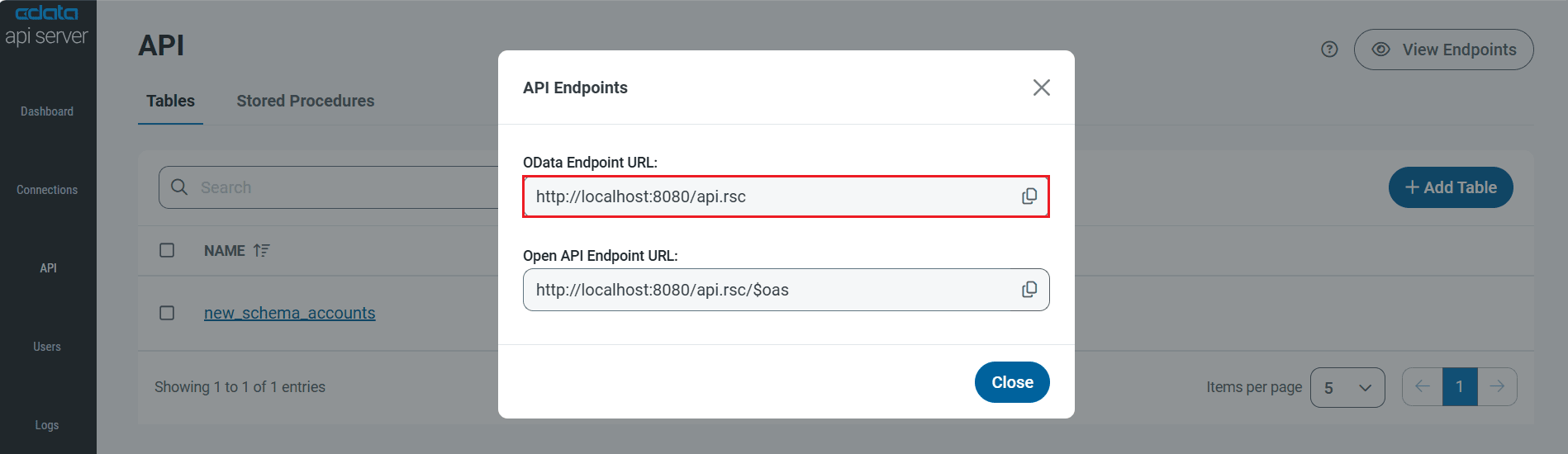
アカウント一覧は、以下のエンドポイントに GET リクエストを送信することで取得できます。
http://localhost:8080/api.rsc/new_schema_accounts
認証にはカスタムヘッダー x-cdata-authtoken を使用します。
GET /api.rsc/new_schema_accounts?$top=2 HTTP/1.1
Host: localhost:8080
x-cdata-authtoken: "YOUR_TOKEN_HERE"
Accept: application/json
ルートオブジェクトには value というプロパティがあり、レコードの配列が格納されています。このデータは REST(OData)エンドポイントとして公開された MySQL Accounts テーブルから直接取得されます。レスポンスのサンプルは以下のとおりです。
{
  "@odata.context": "http://localhost:8080/api.rsc/$metadata#new_schema_accounts",
  "value": [
    {
      "AccountID": 1,
      "AccountName": "Alice John",
      "Email": "alice@example.com",
      "Balance": 2500.75,
      "CreatedAt": "2025-09-26T20:48:32.000+05:30"
    },
    {
      "AccountID": 2,
      "AccountName": "Bob Smith",
      "Email": "bob@example.com",
      "Balance": 150,
      "CreatedAt": "2025-09-26T20:48:32.000+05:30"
    }
  ]
}
API リクエストで使用するパッケージ
Go の標準ライブラリに含まれる net/http パッケージで HTTP リクエストを送信し、encoding/json で JSON レスポンスをパースします。どちらも標準ライブラリの一部なので、追加の依存関係は不要です。
プロジェクトの準備
以下のコマンドで新しい Go プロジェクトをセットアップします。
mkdir AccountsAPIRequestSample
cd AccountsAPIRequestSample
go mod init AccountsAPIRequestSample
New-Item -ItemType File main.go
レスポンスを格納する構造体の準備
2 つの構造体を定義します。
- AccountsRoot:トップレベルの JSON オブジェクト用
- Account:MySQL Accounts テーブルの各レコード用
type AccountsRoot struct {
    ODataContext string    `json:"@odata.context"`
    Value        []Account `json:"value"`
}

type Account struct {
    AccountID   int     `json:"AccountID"`
    AccountName string  `json:"AccountName"`
    Email       string  `json:"Email"`
    Balance     float64 `json:"Balance"`
    CreatedAt   string  `json:"CreatedAt"`
}
JSON タグを使用する理由
Go では、大文字で始まるフィールドや関数はエクスポートされ、小文字で始まるものはプライベートとして扱われます。
json.Unmarshal を呼び出すと、JSON キーはエクスポートされたフィールドにのみマッピングされます。例えば、フィールドを value []Account(小文字の v)と定義した場合、JSON パーサーはそのフィールドにデータを格納しません。
JSON キーを正しくマッピングするには、以下の手順に従います。
- 構造体のフィールドを大文字で始めます(Value、AccountID、AccountName など)。
- `json:"value"` や `json:"AccountID"` のような構造体タグを使用して、JSON プロパティ名を Go フィールドに明示的にマッピングします。
これらの手順により、CData API Server からの JSON レスポンス(ソーステーブルから取得)が Go 構造体に正しく格納されます。
API リクエストの実行
API リクエストを実行する際、認証ヘッダー(x-cdata-authtoken)を含めるために http.Get の代わりに http.NewRequest を使用します。
url := "http://localhost:8080/api.rsc/new_schema_accounts?$top=2"
authHeaderName := "x-cdata-authtoken"
authHeaderValue := "YOUR_AUTHTOKEN"

req, _ := http.NewRequest(http.MethodGet, url, nil)
req.Header.Set(authHeaderName, authHeaderValue)
req.Header.Set("Accept", "application/json")

client := new(http.Client)
resp, err := client.Do(req)
ステータスコードを確認してエラーを処理し(例:トークンが正しくない場合の認証エラー)、メモリリークを防ぐために常にレスポンスボディをクローズします。
続いて、ボディを読み取り、JSON を Go 構造体にアンマーシャルします。
完全なソースコード
package main

import (
	"encoding/json"
	"fmt"
	"io"
	"net/http"
	"os"
)

func main() {
	fmt.Println("Start!")

	// CData API Server で公開された MySQL Accounts テーブル
	url := "http://localhost:8080/api.rsc/new_schema_accounts?$top=2"
	authHeaderName := "x-cdata-authtoken"
	authHeaderValue := "YOUR_AUTHTOKEN"

	req, err := http.NewRequest(http.MethodGet, url, nil)
	if err != nil {
		fmt.Println("Error creating request:", err)
		os.Exit(1)
	}
	req.Header.Set(authHeaderName, authHeaderValue)
	req.Header.Set("Accept", "application/json")

	client := new(http.Client)
	resp, err := client.Do(req)
	if err != nil {
		fmt.Println("Error making request:", err)
		os.Exit(1)
	}
	defer resp.Body.Close()

	if resp.StatusCode != http.StatusOK {
		fmt.Println("Error Response:", resp.Status)
		os.Exit(1)
	}

	body, err := io.ReadAll(resp.Body)
	if err != nil {
		fmt.Println("Error reading body:", err)
		os.Exit(1)
	}

	var out AccountsRoot
	if err := json.Unmarshal(body, &out); err != nil {
		fmt.Println("Error parsing JSON:", err)
		fmt.Println("Raw:", string(body))
		os.Exit(1)
	}

	pretty, _ := json.MarshalIndent(out, "", "  ")
	fmt.Println(string(pretty))
}

type AccountsRoot struct {
	ODataContext string    `json:"@odata.context"`
	Value        []Account `json:"value"`
}

type Account struct {
	AccountID   int     `json:"AccountID"`
	AccountName string  `json:"AccountName"`
	Email       string  `json:"Email"`
	Balance     float64 `json:"Balance"`
	CreatedAt   string  `json:"CreatedAt"`
}
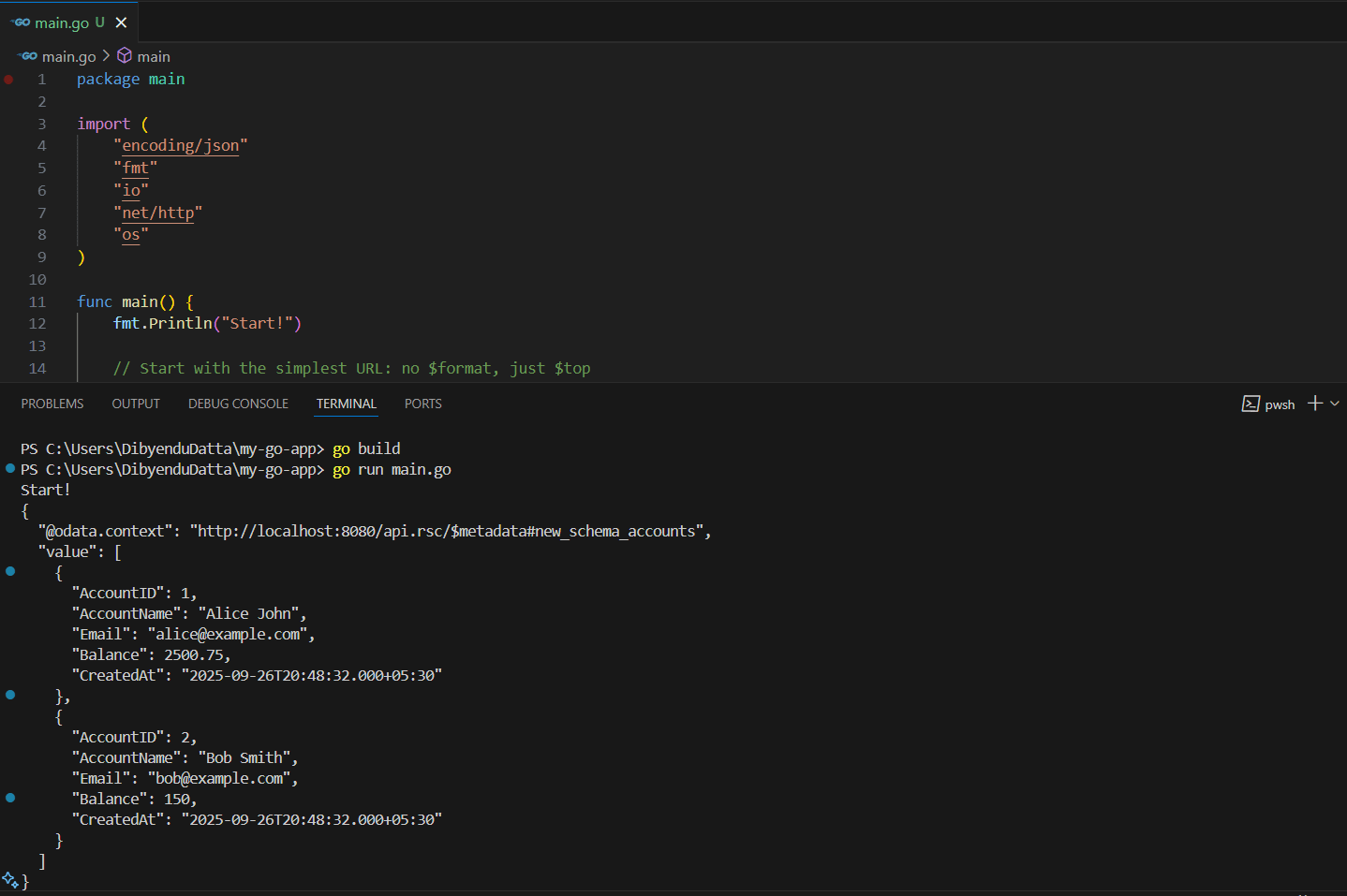
Go と CData API Server でデータアクセスをシンプルに
CData API Server を使用すると、300 以上のデータベース、Web アプリケーション、SaaS プラットフォームのデータをセキュアで標準ベースの API として公開できます。Go 開発者にとっては、カスタムドライバーや複雑なコネクタを構築することなく、リアルタイムデータをアプリケーションに統合できることを意味します。
CData API Server の 30 日間無料トライアルで、あらゆるデータソースを RESTful API として公開し、Go アプリケーションに簡単に接続してみてください。サポートが必要な場合は、CData サポートチームがいつでもお手伝いします。